Assume we have the following two tables. TableA is on the left, and TableB is on the right. We'll populate them with four records each.
TABLE A			TABLE B
id name       		id  name
-- ----       		--  ----
1  Pirate     		1   Rutabaga
2  Monkey     		2   Pirate
3  Ninja      		3   Darth Vader
4  Spaghetti  		4   Ninja
create table TableA (id
number(2), name varchar2(30));
create table TableB (id number(2), name
varchar2(30));
insert into TableA values(1,'Pirate');
insert into TableA values(2,'Monkey');
insert into TableA values(3,'Ninja');
insert into TableA values(4,'Spaghetti');
insert into TableB values(1,'Rutabaga');
insert into TableB values(2,'Pirate');
insert into TableB values(3,'Darth Vader');
insert into TableB values(4,'Ninja');
COMMIT;
Let's join these tables by the name field in a few different ways and see if we can get a conceptual match to those nifty Venn diagrams.
INNER JOIN produces only the set of records that match
|
 |
FULL OUTER JOIN produces the set of all records in Table A and |
 |
LEFT OUTER JOIN(With common data) produces a complete set of records |
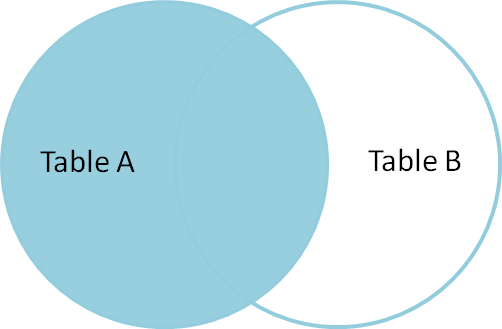 |
LEFT OUTER JOIN(With UNIQUE data) produces a complete set of records To produce the set of records only in Table A, but not
in
Table B, we
perform the same left outer join, then exclude
the records we
don't want from the right side via a where clause. SELECT * or SELECT * FROM
TableA |
 |
SELECT * FROM TableA To produce the set of records unique to Table A and Table B, we perform the same full outer join, then exclude the records we don't want from both sides via a where clause. |
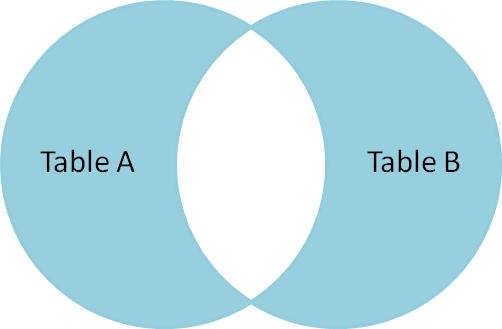 |
There's also a cartesian
product or
cross join, which as far as I can tell, can't
be
expressed as a Venn diagram:
SELECT *
FROM TableA ,  TableB;

SELECT *
FROM TableA CROSS JOIN TableB;
This joins "everything to everything", resulting in 4 x 4 = 16
rows, far more than we had in the original sets. If you do the
math,
you can see why this is a very dangerous join to run
against
large tables.
More
information on ANSI / ISO SQL 99 Standards
http://www.oracle-base.com/articles/9i/ANSIISOSQLSupport.php
http://www.oracle-developer.net/display.php?id=213
More
on Outer Joins
eg. Suppose we have two tables:
Person
------
Person_id   Name                   Address_id
---------   ----------------       ----------
00001       Fred Bloggs            00057
00002       Joe Smith              00092
00003       Jane Doe
00004       Sue Jones              00111


Address
-------
Address_id   Address_Desc
----------   -------------------------
00057        1, Acacia Avenue, Anytown
00092        13, High Street, Anywhere
00113        52, Main Road, Sometown
Then the simple join:
SELECT PERSON.NAME, ADDRESS.ADDRESS_DESC
  FROM PERSON, ADDRESS
  WHERE PERSON.ADDRESS_ID = ADDRESS.ADDRESS_ID
returns:

NAME          ADDRESS_DESC
----------    ------------
Fred Bloggs   1, Acacia Avenue, Anytown
Joe Smith     13, High Street, Anywhere
But the outer join:
SELECT PERSON.NAME, ADDRESS.ADDRESS_DESC
  FROM PERSON, ADDRESS
  WHERE PERSON.ADDRESS_ID = ADDRESS.ADDRESS_ID(+)
returns:

NAME          ADDRESS_DESC
----------    ------------
Fred Bloggs   1, Acacia Avenue, Anytown
Joe Smith     13, High Street, Anywhere
Jane Doe
Sue Jones
Note the two new rows for Jane Doe and Sue Jones. These are the
people
who do not have matching records on the ADDRESS table. Sue Jones
had an
address_id on her PERSON record, but this didn't match an
address_id on
the ADDRESS table. ( Probably a data inconsistency ).
Jane
Doe
had NULL in her PERSON.ADDRESS_ID field, which obviously doesn't
match
any
address_id on the ADDRESS table.
Note that the outer join is created by including (+) on the
WHERE
clause
which joins the two tables. The (+) is put against the
column-name on
the
deficient table, ie. the one with the missing rows. It is
very
important
to put the (+) on the correct table: putting it on the other
table will
give
different results. eg. the query:
SELECT PERSON.NAME, ADDRESS.ADDRESS_DESC
  FROM PERSON, ADDRESS
  WHERE PERSON.ADDRESS_ID(+) = ADDRESS.ADDRESS_ID
returns:

    NAME          ADDRESS_DESC
    ----------    ------------
    Fred Bloggs   1, Acacia Avenue, Anytown
    Joe Smith     13, High Street, Anywhere
                  52, Main Road, Someplace
Anti
Joins and Semi-Joins
Anti-joins:
Anti-joins are written using the NOT EXISTS or NOT IN
constructs. An
anti-join between two tables returns rows from the first table
for
which there are no corresponding rows in the second table. In
other
words, it returns rows that fail to match the sub-query on the
right
side.
Suppose you want a list of departments with no employees. You
could
write a query like this:
SELECT d.department_name
  FROM departments d
MINUS
SELECT   d.department_name
  FROM departments d, employees e
  WHERE d.department_id = e.department_id
ORDER BY department_name;
The above query will give the desired results, but it might be clearer to write the query using an anti-join:
SELECT d.department_name
  FROM departments d
  WHERE NOT EXISTS (SELECT NULL
                      FROM employees e
                      WHERE e.department_id = d.department_id)
ORDER BY d.department_name;
Semi-joins:
Semi-joins are written using the EXISTS or IN constructs. A
semi-join
between two tables returns rows from the first table where one
or more
matches are found in the second table. The difference between a
semi-join and a conventional join is that rows in the first
table will
be returned at most once.
Suppose you want a list of departments with at least one
employee. You
could write the query like this:
SELECT d.department_name
  FROM departments d, employees e
  WHERE d.department_id = e.department_id
  ORDER BY department_name;
The department name in the query result will appear as many
times as
the number of employees in it. So, for example if a department
has 30
employees then that department will appear in the query output
30 times.
To eliminate the duplicate rows, you could use the DISTINCT or
GROUP
BY keywords. A more elegant solution is to use a semi-join
between the
departments and employees tables instead of a conventional join:
SELECT d.department_name
  FROM departments d
  WHERE EXISTS (SELECT NULL
                  FROM employees e
                  WHERE e.department_id = d.department_id)
  ORDER BY d.department_name;
The above query will list the departments that have at least one employee. The department will appear only once in the query output no matter how many employees it has.
Equi
and non-Equijoins
The join condition determines whether a join is an equijoin or a
non-equijoin. An equijoin is a join with a join condition
containing an
equality operator. An equijoin combines rows that have
equivalent
values for the specified columns. When a join condition relates
two
tables by an operator other than equality, it is a non-equijoin.
A
query may contain equijoins as well as non-equijoins.
Equijoins are the most commonly used. An example of an equijoin:
SELECT e.first_name, d.department_name
  FROM employees e INNER JOIN departments d
       ON e.department_id = d.department_id;

     FIRST_NAME              DEPARTMENT_NAME
-------------------- ------------------------------
Steven               Executive
Neena                Executive
Lex                  Executive
Alexander            IT
Bruce                IT
Non-equijoins are less frequently used. An example of a non-equijoin:
SELECT zip_codes.zip_code, zones.ID AS zip_zone,
       zones.low_zip, zones.high_zip
  FROM zones INNER JOIN zip_codes
       ON zip_codes.zip_code BETWEEN zones.low_zip AND zones.high_zip;

ZIP_CODE ZIP_ZONE LOW_ZIP HIGH_ZIP
-------- -------- ------- --------
57000    1        57000   57999
84006    2        84000   84999