Oracle
GoldenGate Concepts
Download and Installation
Help and Informational Commands
Good Examples
This post covers Overview & Components of Oracle GoldenGate (software for real-time data integration and replication in heterogeneous IT Systems).
Oracle Goldengate is a must know for DBAs & consists of following components:
- Manager
- Extract
- Data Pump
- Collector
- Replicat
- Trails Files

1. Extract
Oracle GoldenGate extract process resides on the source system and captures the committed transactions from the source database. The DB logs may contain committed as well as uncommitted data but, remember, extract process captures only committed transactions and write them to local trail files. It is important to note that Extract captures only the committed transaction from its data source.
The extract can be configured for any of the following purposes:
- Initial Load: For the Initial Load method of replication, extract captures a static set of data directly from the source table or objects.
- Change Synchronization: In this method of replication, extract process continuously captures data (DML and DDL) from the source database to keep the source and target database in a consistent state of replication and it is sole method to implement continuous replication between the source and target database.
The data source of the extract process could be one of the following
- Source table (if the extract is configured for initial load)
- The database transaction logs or recovery logs such as (Oracle Redo Logs, Oracle Archive Logs, or SQL audit trails or Sybase transaction logs) depending on the type of source database.
- Third party capture module can also be used to extract transactional data from the source database. In this method, the data and metadata from an external API are passed to the extract API.
Extract captures changes from source database based on the extract configuration (contains the objects to be replicated from the source database).
Multiple extract processes can be configured on a source database to operate on same/different source objects.
The extract performs either of the following tasks after extracting the data/records from the source database objects.
- Delivers the data extracted from source to the target server Trail Files through collector process
- Writes the data extracted from source on to the Local Trail Files on source system
Optionally, Extract can also be configured to perform data filtering, transformation and mapping while capturing data and or before transferring the data to the target system.
2. DataPump
This is an optional GoldenGate process (server process) on the source system and comes into picture when the extracted data from the source is not directly transferred to the target Trail Files. In the DataPump setup, the extract process gets the records/data from a source and keeps it in the local file system by means of local Trail Files. The DataPump acts as a secondary extract process where it reads the records from Local Trail Files and delivers to the Target system Trail files through the collector.
Data Pump is also known as secondary extract process. It is always recommended to include data Pump in Goldengate configuration.
3. Collector
The collector is a server process that runs in the background on the target system in a GoldenGate replication setup where the extract is configured for continuous Change Synchronization.
Collector has the following roles to perform in the GoldenGate replication.
- When a connection request is sent from the source extract, the collector process on the target system scan and map the requesting connection to the available port and send the port details back to the manager for assignment to the requesting extract process.
- Collector receives the data sent by source extract process and writes them to Trail Files on the target system.
There is one collector process on the target system per one extract process on the source system, i.e it is a one to one mapping between extract and collector process.
4. Replicat
The Replicat process runs on the target system and is primarily responsible for replicating the extracted data delivered to the target trail files by the source extract process.
The replicat process scans the Trail Files on the target system, generates the DDL and DML from the Trail Files and finally applies them on to the target system.
Replicat has the following two types of configuration which relates to the type of extract being configured on the source system.
- Initial loads: In initial data loads configuration, Replicat can apply a static data copy which is extracted by the Initial load extract to target objects or route it to a high-speed bulk-load utility.
- Change synchronization: In change synchronization configuration, Replicat applies the continuous stream of data extracted from the source objects to the target objects using a native database interface or ODBC drivers, depending on the type of the target database.
Optionally, Replicat can also be configured to perform data filtering, transformation, and mapping before applying the transaction on to the target database
5. Trail or Extract Files
Trails or Extract Files are the Operating system files which GoldenGate use to keep records extracted from the source objects by the extract process. Trail files can be created on the source system and target system depending on the GoldenGate replication setup. Trail Files on the source system are called Extract Trails or Local Trails and on the target system called as Remote Trails.
Trail files are the reason why Goldengate is platform independent.
By using trail GoldenGate minimizes load on the source database as once the transaction logs/online logs/redo logs/ archive logs are extracted and loaded by the extract process to trail files, all the operations like filtering, conversions, mapping happens out of the source database. Use of trail file also makes the extraction and replication process independent of each other.
6. Manager
Manager can be considered as the parent process in a GoldenGate replication setup on both source and target system. Manger controls, manages and maintains the functioning of other GoldenGate processes and files. A manager process is responsible for the following tasks.
- Starting up Oracle GoldenGate processes
- Maintaining port number for processes
- Starting up dynamic processes
- Performing GoldenGate Trail Management
- Creating events, errors and threshold report.
Goldengate is a middleware product of Oracle which has a high-performance for real-time data transfer. Goldengate is most popular replication software especially for real-time data replication. Because goldengate is the most successful product in the CDC (change data capture) subject.
Goldengate may be used in disaster recovery solutions also. But Oracle already offers a disaster recovery solution with Dataguard. Goldengate is hybrid structure replication software, so it can replicate not only Oracle-to-Oracle replication, but also cross-platform or database.
It is also possible to install a real-time data warehouse system with Goldengate. you can use following Types of replication with GoldenGate.
- One-to-one (source to target) ( Unidirectional )
- One-to-many (one source to many targets) ( Broadcasting )
- Many to one (hub and spoke) ( Consolidation )
- Cascading
- Bi-directional (active active)
- Bi-directional (active passive)

Goldengate Topologies
• Uni-directional: Data is replicated in one direction from source to target
• Bi-Directional: The data flows in both direction and stays synced up between site A and site B
• Peer to Peer: Similar to Bi-directional but involves more that 2 databases which stay synced up
• Broadcast: Data from source is sent to multiple destinations
• Consolidation: Data from multiple sources is delivered to one destination DB
• Cascading: Data from one source is sent to multiple destinations
Primary Keys
Ensure that all tables have Primary or Unique Key. This is one of the MOST important requirement to ensure proper replication of data without discrepancies. If not an alternative method of surrogate keys can be used.
Memory Requirements
At least between 25 and 55 Mb of RAM memory is required for each GoldenGate Replicat and Extract process. Oracle Goldengate supports up to 300 concurrent processes for Extract and Replicat per Goldengate instance. As a rule of thumb, you will need to take into consideration that at least 1–2 Extract processes and multiple Replicat processes will be required in addition to manager processes for a basic Oracle Goldengate installation. The best way to assess total memory requirement is to run the GGSCI command to view the current report file and to examine the PROCESS AVAIL VM FROM OS (min) to determine if you have sufficient swap memory for your platform.
Disk Space Requirements
Following are some things you should do to ensure having enough disk space to support your Goldengate replication needs:
• Allocate at least 50–150 MB of disk space for the Oracle GoldenGate software binaries.
• Allocate 40 MB of disk space per instance of Goldengate for working directories and files per server. For a basic configuration with Oracle Goldengate, you will need to allocate 40 MB on the source and 40 MB on the target system for a total requirement of 80 MB of disk space.
• Allocate sufficient disk space to temporary files to accommodate GoldenGate operations. By default, Goldengate stores temporary files in the dirtmp directory under the default installation directory. A good rule of thumb to use for temp file space is around 10 GB of disk space.
• Plan on at least 10 MB per trail file. As a rule of thumb, we recommend that you start with at least 1 GB of disk space allocated per system for trail files. Alternatively, use the following formula that Oracle provides to determine the amount of disk space to set aside:
[log volume in one hour] x [number of hours downtime] x 0.4 = trail disk space.
One way to calculate the total amount required for trail file space is by querying the V$ARCHIVED_LOG view from within the source Oracle database. The following query shows you how to do so:
|
|
select trunc(COMPLETION_TIME),count(*)*100 size_in_MB from v$archived_log group by trunc(COMPLETION_TIME); TRUNC(COM SIZE_IN_MB --------- ---------- 15-MAY-11 500 |
Run tests after installing Goldengate to measure your
specific transaction mix and
load, and to gauge the total disk space required for trail files.
Operating System Requirements
Linux or UNIX:
• Grant read and write privileges for the operating system (OS) account used to install the Oracle Goldengate software.
• Place the Oracle Goldengate software on a shared disk in a clustered environment, or on a shared clustered filesystem that all cluster nodes have access to. Another Option is to install it on EACH DB Server
• Install from an operating and database system account that has read/write
Download & Installation (Both Sites)
This post covers Download & Installation of Oracle GoldenGate 12c (12.2.0.1.1) (software for real-time data integration and replication in heterogeneous IT Systems).
Create Oracle Golden Gate staging directory and home directory in BOTH DB Servers
D:\>cd oracle
md gg_stage
md gg_home\product\12.2.0\oggcore_1
cd oracle\gg_home\product\12.2.0\oggcore_1
Download the File Oracle GoldenGate 12.2.0.2.181009 for Oracle on Microsoft Windows x64 (64-bit), 327.9 MB V980625-01.zip.
The software should be installed on both servers.
Unzip the Golden Gate media and click on setup.exe file to initiate installation.
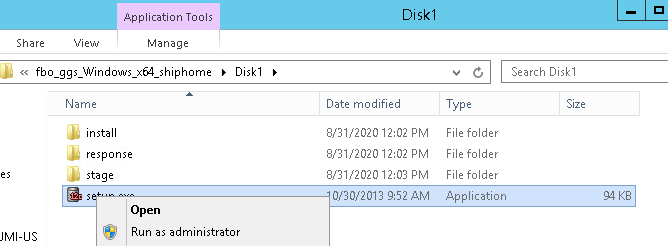
Choose on which database version you installing golden gate.

Provide Oracle Golden Gate Home and Oracle Database Home location and port number. I used:
E:\oracle\gg

When the Installation is successful, click close.
Once Installation done, login to Golden gate from gg home and check the version.
Cd E:\oracle\gg
ggsci

Type
info all

NOTE = If you get an error on MSVCR100.dll

Solution: This DLL is a part of the Microsoft Visual C++ 2010 Redistribution Package (x64). (vcredist_x64.exe)
Download from here and install.
NOTE = If you get an error on MSVCP140.dll

Solution: This DLL is a part of the Microsoft Visual C++ 2015, 2017 and 2019 Redistribution Package (x64). (vcredist_x64.exe)
Download from here and install.
On the source and target server add the following entries to /home/oracle/.bash_profile
export LD_LIBRARY_PATH=/home/oracle/goldengate:$ORACLE_HOME/lib
Ensure the environment variables are set using:
source /home/oracle/.bash_profile
Create GoldenGate Subdirectories (Both Sites)
On each server create subdirectories for GoldenGate using the CREATE SUBDIRS command. For example:

As seen above, it will create below subdirectories.
- dirtmp - For storing temp files
- dirsql - For storing SQLs
- dirrpt - For storing report files
- dirpcs - For storing
- dirout - For storing output files
- dirdef - For storing
- dirdat - For storing trail files
- dirchk - For storing checkpoint files
Below are the brief description of each directory:
| Sub-directories | Description |
| dirbdb | This directory contains the GoldenGate datastore files |
| dirchk | This directory contains the GoldenGate checkpoint files. Extract and Replicat processes stores current read and write positions in the checkpoint file to support data accuracy and fault tolerance. Extension of the file is either .cpe for Extract checkpoint files or .cpr for Replicat checkpoint files. |
| dircrd | This directory contains the GoldenGate Credential Store |
| dirdat | This directory contains the GoldenGate trail files. Created by Extract/Pump processes to store records of extracted data for further processing (example to be processed further by replicat process).File name format starts with a user-defined two-character prefix. |
| dirdef | This directory contains the GoldenGate definition mapping files. data definitions files are created by the DEFGEN utility and it contain source or target data definitions used in a heterogeneous synchronization environment. Written in external ASCII. File name format is a user-defined name specified in the DEFGEN parameter file. |
| dirdmp | This directory contains the GoldenGate process dump |
| dirjar | This directory contains the GoldenGate Java Archive |
| dirout | This directory contains the GoldenGate output files |
| dirpcs | This directory contains the GoldenGate process files. It is default location for status files. File name is <group>.<extension> where <group> is the name of the group and <extension> is either pce (Extract), pcr (Replicat), or pcm (Manager). These files are only created while a process is running. The file shows the program name, the process name, the port and process id that is running. |
| dirprm | This directory contains the GoldenGate process parameter files. It store run-time parameters for GoldenGate process groups or utilities. Written in external ASCII format. File name format is <group name/user-defined name>.prm or mgr.prm. |
| dirrpt | This directory contains the GoldenGate process
report. It is default location for process report
files created by Extract, Replicat, and Manager
processes to report statistical information relating
to a processing run. Written in external ASCII format. File name format is <group name><sequence number>.rpt where <sequence number> is a sequential number appended to aged files. |
| dirsql | This directory contains the GoldenGate user
defined files. It iis default location for
scripts created by the TRIGGEN utility to contain SQL
syntax for creating GoldenGate logging triggers and
GoldenGate log tables. Written in external format.
File name format is a user-defined name or the
defaults of GGSLOG (table-creation script) or the
table name (trigger-creation script), with the
extension of .sql. |
| dirtmp | This directory contains the GoldenGate temporary files. It is default location for storing large transactions when the size exceeds the allocated memory size. |
| dirwlt | This directory contains the GoldenGate wallet files |
| dirwww | This directory contains the GoldenGate web pages |
| dirver | This directory contains the GoldenGate Veridata files |
Check the connectivity from source to target for replication.
Both source and target side add the host information to /etc/hosts file.
Verify that LOG_MODE is set to ARCHIVELOG (On source)
Archivelog must be enable on source side because if we are using classic capture the extract process will capture the changes information through archivelogs only, So it is mandatory for classic capture replication.
select LOG_MODE from v$database;
shutdown immediate;
startup mount;
ALTER DATABASE ARCHIVELOG;
alter database open;
select LOG_MODE from v$database;

Verify that supplemental logging and forced logging are set properly. (On source)
Enable force logging at the database level. If you are using Oracle 12c Database however, you can alternatively turn force logging at the tablespace level.
ALTER DATABASE FORCE LOGGING;
ALTER DATABASE ADD SUPPLEMENTAL LOG DATA;
select SUPPLEMENTAL_LOG_DATA_MIN,FORCE_LOGGING from v$database;

OR
-- 12c only Activate the Loggging for 1 Tablespace
ALTER DATABASE NO FORCE LOGGING;
ALTER TABLESPACE tablespace_name FORCE LOGGING;
ALTER TABLESPACE tablespace_name NOLOGGING;
ALTER DATABASE ADD SUPPLEMENTAL LOG DATA;
Prepare the database to support ddl replication (optional) ( On source)
Turn off recyclebin for the database . . .
alter system set recyclebin=off scope=spfile;
shutdown immediate
startup
Change parameter GOLDENGATE (on source and target databases):
ALTER SYSTEM SET ENABLE_GOLDENGATE_REPLICATION=TRUE SCOPE=BOTH;
show parameter enable_goldengate
Configure Network
For this basic configuration, an entry is required in the TNSNAMES.ORA file on each server describing the database on the other server.
On the source database (fidelio) I added the following entry for the DIEGO database to $ORACLE_HOME/network/admin/tnsnames.ora
DIEGO =
(DESCRIPTION =
(ADDRESS = (PROTOCOL = TCP)(HOST = wfivm03882.us.oracle.com)(PORT = 1521))
(CONNECT_DATA =
(SERVER = DEDICATED)
(SERVICE_NAME = DIEGO)
)
)
On the target database (DIEGO) I added the following entry for the fidelio database to $ORACLE_HOME/network/admin/tnsnames.ora
FIDELIO =
(DESCRIPTION =
(ADDRESS = (PROTOCOL = TCP)(HOST = wfivm03881.us.oracle.com)(PORT = 1521))
(CONNECT_DATA =
(SERVER = DEDICATED)
(SERVICE_NAME = fidelio)
)
)
Create the GoldenGate administrator (on source and target databases):
A new user should be created to own the GoldenGate database objects.
On each server create the GoldenGate schema owner.
create tablespace GOLDENGATE datafile 'E:\oracle\oradata\fidelio\gg_tbs_data01.dbf' size 100m autoextend on maxsize unlimited;
create user ggate identified by ggate default tablespace GOLDENGATE quota unlimited on goldengate;
grant execute on utl_file to ggate;
grant connect, resource, unlimited tablespace to ggate;
Grant dba to ggate;
OR
grant select any dictionary to ggate;
grant insert any table to ggate;
grant update any table to ggate;
grant delete any table to ggate;
EXEC DBMS_GOLDENGATE_AUTH.GRANT_ADMIN_PRIVILEGE('ggate');
OPTIONAL:
On each server set the GGSCHEMA in the global parameter file.
ggsci
EDIT PARAMS ./GLOBALS

In this example the parameters file is E:\oracle\gg\GLOBALS
Add the following entry:
GGSCHEMA gguser
Save and close the file
In the Source DB Server, Go to Golden Gate Installed location (in our scenario E:\oracle\gg) and then run the following Golden Gate inbuild scripts for creating all necessary objects as SYS:
cd E:\oracle\gg
@marker_setup
@ddl_setup
@role_setup.sql
GRANT GGS_GGSUSER_ROLE TO ggate ;
@ddl_enable.sql (The default trigger name is GGS_DDL_TRIGGER_BEFORE; it is owned by the SYS user.)
Brief Explanation of the Scripts:
DDL replication is implemented using the GGS_DDL_TRIGGER_BEFORE database trigger which is configured to fire whenever a DDL statement is executed. This trigger uses procedures the DDL_REPLICATION package to store the DDL statement and other attributes in the DDL tables.
The most significant DDL tables are:
- GGS_MARKER - all DDL statements executed in the database are stored in this table. CREATE statements are stored in this table.
- GGS_DDL_HIST - only DDL statements executed by non-Oracle users are stored in this table. CREATE statements are not stored in this table.
When the extract process identifies that a DDL statement has been executed, it generates an entry in the extract trail for the DDL statement. The exact process was not entirely clear at the time of writing. However, the likely sequence of events is:
- DDL statement is issued within database
- DDL trigger fires and stores statement in GoldenGate DDL tables
- DDL operation is stored in redo log (operation 24.1)
- Extract process captures DDL operation from redo log
- Extract process looks up corresponding entries in GoldenGate DDL tables
- Extract process stores DDL statement and attributes in GoldenGate trail.
Once the DDL statement and attributes have been stored in the GoldenGate trail, they can be processed as normal by the data pump and replicat processes.
GGSCI DDL Dumps
The contents of the metadata stored in GGS_DDL_HIST table can be dumped using the DUMPDDL SHOW command in GGSCI.
Help and Informational Commands
GGSCI>
HELP
GGSCI> HELP ALL
GGSCI> HELP ADD EXTRACT
GGSCI> HELP ADD EXITRAIL
GGSCI>
set editor emacs
GGSCI> set editor vi
GGSCI> HISTORY
--
View the GoldenGate application log (view GGS Event )
-- Oracle GoldenGate error log (ggserr.log file)
GGSCI> VIEW GGSEVT
--
View a brief informational summary of all processes
GGSCI> -- INFO ALL [TASKS | ALLPROCESSES]
GGSCI> INFO ALL
GGSCI> info all tasks
GGSCI> info all allprocesses
GGSCI>
status extract initext
GGSCI> INFO EXTRACT INITEXT
GGSCI> INFO EXTRACT INITEXT,DETAIL
GGSCI> info extract extora,
showch,detail,tasks,allprocesses
GGSCI> info extract
initext,showch,detail,tasks,allprocesses
GGSCI> VIEW REPORT INITEXT
GGSCI>
send extract extora, report
GGSCI> view report extora
GGSCI>
stats <group>
GGSCI> stats <group>, TABLE *, TOTALSONLY *
GGSCI> send extract extora, rollover
Oracle GoldenGate Installation, Part 1
https://blog.pythian.com/oracle-goldengate-installation-part-1/
Setting Up Table Replication In Oracle Goldengate
http://oracle-help.com/goldengate/setting-table-replication-oracle-goldengate/
Multi-Master Oracle Replication Using GoldenGate
http://houseofbrick.com/multi-master-oracle-replication-using-goldengate/
Golden Gate: Setup Bi-Directional Replication in Multi-tenant Environment (PDBs)
https://eclipsys.ca/goldengate-setup-bi-directional-replication-in-multitenant-environment-pdbs/
Installation And Configuration Of GoldenGate 19c Microservices On RAC
GG
Commands
http://www.dba.ant.lviv.ua/articles/goldengate
MOS Master Note
Master Note - Oracle GoldenGate (Doc ID 1298817.1)